Whether you're acquiring sound bites for a spot, editing interviews for a podcast, or mixing a sound-rich feature, capturing and producing high quality audio is a top priority. This guide offers tips toward that end. Once you've scrolled through the guide please complete the questionnaire regarding your equipment and software access. And share any questions or concerns you might have about audio production. Members of the CapRadio Production Team are available to work with you one-on-one to help you hone your skills. Just contact Content Production Manager Mark Jones.
Section One: Recording and Capturing Audio
Microphone position and proximity are among the most crucial factors in getting the best audio. Strive for a distance of about 4-6 inches from the interviewee's mouth when positioning your microphone. That's roughly the span from your outstretched thumb to your pinky. The louder a person talks, the further away you should be. If they're a soft speaker, get closer. Be sure to point the microphone at the subject's mouth from a slight angle, either from below or from the side, to minimize p-pops (plosives).
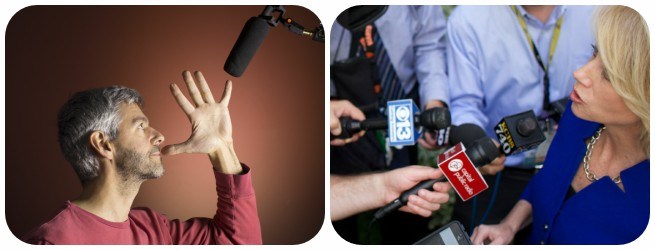
Even if you're within close proximity, if you don't aim at the mouth the audio will be compromised. Here's a good illustration from NPR.
Record volume is another crucial factor in sound collection. Levels set too high will produce distortion rendering your audio unusable, while ultra low levels require amplification later. That raises the noise floor and makes your sound bites less intelligible. CapRadio's "sweet spot" record level is somewhere in the range of -6db to -9db. While your audio will occasionally spike higher and dip lower, make that your target range.
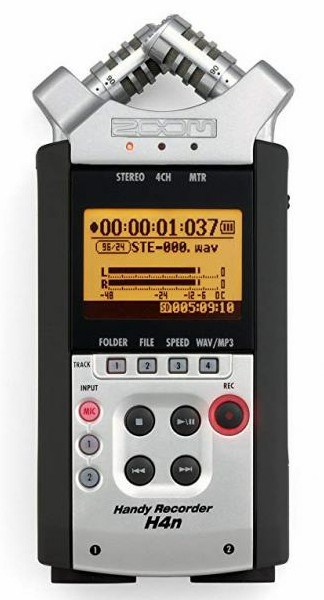
The sonic environment of your interview location can negatively impact the audio. In a noisy setting seek out the quietest spot you can find and position your subject so that the microphone is aimed away from the noise source. Position the mic as close as possible to your subject to prevent background noise from leaking in and drowning them out. Watch your record levels to avoid distortion.
It's essential to record room tone/ambient sound with your interview. This extra audio will be extremely helpful in the editing process. Record 30-60 seconds of location sound, with no one talking, either before you start the interview or after you're done. Don't change record levels from the level you use for the interview. Even though the room tone recording will be substantially quieter than your interview, it will be relatively the same volume as the background noise in your interview.
Note: If you're capturing a scene where some activity is taking place, you will want set your record levels in the same way you would set them for an interview (i.e. between -6 and -9 db). This type of recording, commonly referred to as "nat sound" is different from room tone as it will be featured "in the clear" and not just laid underneath narration and sound bites.
The preferred settings for recording and editing audio at CapRadio are: WAV 44100Hz Mono 16-bit. You can save and edit files in the MP3 format if you wish, although it's essential that you use the higher quality MP3 settings of 128 kbps (mono) or 256 kbps (stereo) in addition to the 44100Hz/16-bit settings. No matter the initial format you use, the final version of your audio should be high quality mp3 when you upload it to Newsboss or send it to the Digital team for the website.
Pay attention to audio from outside sources. If someone from another station or organization shares audio with you, be sure to note the file type. If it varies from our default settings you'll need to convert it in Audition. For example NPR and many other sources use the sample rate of 48000 instead of 44100. Also, if someone sends you audio from an iPhone it will likely be an m4a 32-bit file that will need to be converted.
Capturing audio from Zoom, Skype or other video conferencing interviews
"Tape synch" options
Still to be completed, this section needs special attention as many interviews are being conducted this way in the current environment
Section Two: Transferring Audio and File Management
(This section will detail how to get audio from digital recorder to desktop or laptop workstation. It will also note standard settings and recommended folder and file conventions)
After your interview or other sound recording is complete, connect the USB cable from the digital recorder to your computer and copy the file(s) to your desktop or other easily accessible place. Alternatively you can remove the SD card from your recorder and insert it into your computer. When the transfer is finished, disconnect the USB cable or remove the SD card. (This prevents you from inadvertently saving to the digital recorder's card instead of to the local drive on your computer.)
Create a folder for this story/feature in which you will place all of your content. As you extract sound bites from your interview you should save them as separate files in this same folder, leaving your original source file unchanged.
You'll want to rename your original files. For example, change the Zoom generated name of "MONO-16.WAV" to something like "220210 John Doe interview.WAV." This makes your content searchable in the future. As you extract soundbites, you might name them using topical slugs like: "John Doe DESCRIBES FIRE DAMAGE.wav" or "John Doe ON PROP 25.wav." Everyone has their own approach to organization.
These are merely suggestions. But the more descriptive you are initially, the easier it will be to work with your content now and into the future.
Section Three: Basic Audio Editing
(This section will demonstrate basic editing practices (in single file mode) and will focus on balancing the audio of individual soundbites, bringing it up to broadcast standards. It will also briefly deal with "fattening up" thin sounding phone or video conferencing audio and will give easy-to-use directions for minor noise reduction of problematic audio.)
Section Four: Mixing and Producing Final Product
This section will give basic instruction for using the multitrack (session) view in Audition to assemble spots and superspots with narration and sound bites. It will touch on how to work with "nat sound" in a superspot or feature.